GIF IT UP 2023
GIF IT UP 2023について
Join us for GIF IT UP 2023, a festival of digital content utilization.
Table of Contents
What is GIF IT UP?
GIF IT UP is an annual GIF-making contest that celebrates creative remixing of cultural heritage. It’s run by Europeana in partnership with organisations from around the world, including Japan Search, Art Institute of Chicago, DAG Museums, DPLA, Digital NZ, Bibliothèque et Archives nationales du Québec (BAnQ), Centro de Fotografía de Montevideo and Trove.
Japan Search has been a content partner of GIF IT UP since 2020.
Anyone interested in this event can participate free of charge. Entrants create and submit GIF animation works based on digital images provided by integrated portals in their countries, which are then judged by an external jury and participants' votes to determine the winning works (prizes are awarded to the winning works). This year's entry period is from October 1 to 31.
List of entries for 2022 (link to GIF IT UP website)
List of winning entries for 2022 (link to GIF IT UP website)
List of entries for 2021 (link to GIF IT UP website)
List of winning entries for 2021 (link to GIF IT UP website)
Rules
- Entry is free!
- Entries must be submitted via the GIF IT UP submission form.
- Entries must include a piece of digital heritage content sourced from one of the following linked websites: Europeana, Digital Public Library of America, DigitalNZ, Trove, Japan Search, Art Institute of Chicago, DAG Museums, Bibliothèque et Archives nationales du Québec and Centro de Fotografía de Montevideo. Entries that do not contain an item from these sources will not be considered.
- A maximum of 3 GIFs may be entered.
- GIF submissions must be no larger than 2MB.
- Each entry must contain the URL(s) to the source material (e.g. https://www.europeana.eu/item/90402/SK_A_3089); entries submitted without a URL will not be considered.
- All source material used in GIFs must be available for free reuse, i.e. the item is in the public domain, has no known copyright, or is openly licensed. Content restricted to non-commercial use or ‘no derivatives’ is not eligible for use in this contest. To retrieve copyright free material on BAnQ numerique, on a result page, check the box “Domaine public in Canada” (public domain in Canada) and define dates to limit the search. Make sure the date chosen is before 1949. You can also follow this link.
- Entries submitted to GIF IT UP that use public domain or CC0 material grant the contest organisers the right to assign a Creative Commons Attribution 4.0 International (CC BY 4.0) licence to this work. Entries containing Creative Commons-licensed content will also be assigned a CC BY 4.0 licence unless the source has an SA component to the licence, in which case the same licence will be applied.
- Entries will be judged by an external jury and their decision is final; no correspondence will be entered into.
- The organisers reserve the right to disqualify works that breach intellectual property rights, contain language or imagery that is offensive or obscene, or material that is confidential or invasive of personal privacy, or infringes the rights of any other person.
- In uploading your entry you give permission for Europeana, its contest partners and the jury to post your work to the GIF IT UP website, GIPHY.com and to promote your entry via other online platforms, for promotional and editorial purposes.
- Please be aware of those with impaired vision when making your GIF. Consider slowing down the animation and providing descriptive contextual information with your entry.
Quoted from the following page
How to make a GIF?
GIFとは、いわゆる「パラパラマンガ」のように、静止画をつなぎ合わせてアニメーションを作成できる画像ファイルフォーマットです。拡張子は「.gif」です。画像編集ソフトで作成できるほか、ウェブ上でもGIFアニメーションを作成できる無料ツールが多数公開されています。
以下では、最もシンプルなGIFアニメーションの作り方をご紹介します。
(1) まずは素材を選びましょう。
作品に用いる画像は、GIF IT UPの「Selected Collections – Get Inspired!」のページで探すことができます。主題、所蔵館名等を手掛かりに、好みの作品を探してみてください。ジャパンサーチからは次のコレクションを提供しています。
Collections offered by Japan Search
★著作権の確認!
著作権的に問題のない画像であるかどうか、確認しましょう。ライセンスがCC0、PDM、CC BY、CC BY-SAのいずれかであれば問題ありません。
今回は、ジャパンサーチで検索してみつけた「校舎・人物・流星」を選びました。ライセンスは「PDM」です。
(2) 素材が決まったら、画像をダウンロードします。
「収録データべースで開く」ボタンを押すと、ジャパンサーチと連携している佐賀県立図書館の「佐賀県立図書館データベース」のページに飛ぶので、ここで画像をダウンロードします。
PDF形式で提供されているので、「Acrobat」を使ってJPEG形式の画像を書き出しました。
(3) 画像編集ソフト等を使って、画像を編集します。
今回は「Photoshop」を利用しました。
アニメーションをつけたい要素を選択して新規レイヤーにコピー&ペーストします。
【流れ星レイヤー】
2つ作成して、流れ星の位置を編集。右上から流れてくる動きを表現します。
【空レイヤー】
以下の4つのレイヤーを用意します。
- 流れ星を塗りつぶしたもの
- さらに周りの星を塗りつぶしたもの(オリジナルの青・オレンジ・紫の3つ)
【建物の窓レイヤー】
色調を変えて明かりがついたように見せます。
これらのレイヤーをオリジナルの画像に重ねて、6つのコマを作り、JPEG形式で書き出します。
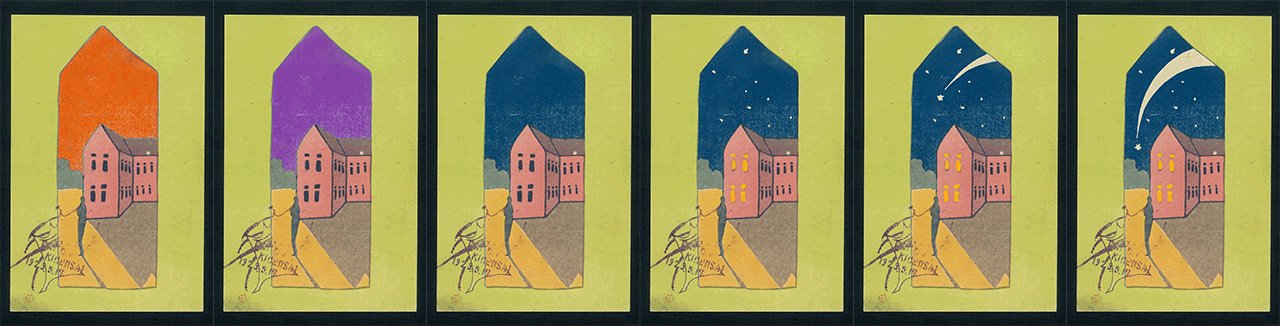
(4) 編集した画像を、GIF作成ツールでつなぎ合わせます。
今回は、無料のGIF作成サイトで作成しました。(この作業は、画像処理ソフトや、新しいバージョンのPowerPointでも行うことができます。)
基本的には、画像をアップロードし、画像の順番、コマ送りの秒数、ループの有無を設定し、GIFファイルとしてエクスポートする仕組みになっています。アップロードできる画像のファイル形式やファイルサイズ、枚数などは、ツールやサイトによって異なります。また、ツールやサイトによっては、透過画像を重ね合わせたり、画像サイズを指定・統一したりすることができるものもあります。
(5) GIFアニメーションの完成です。
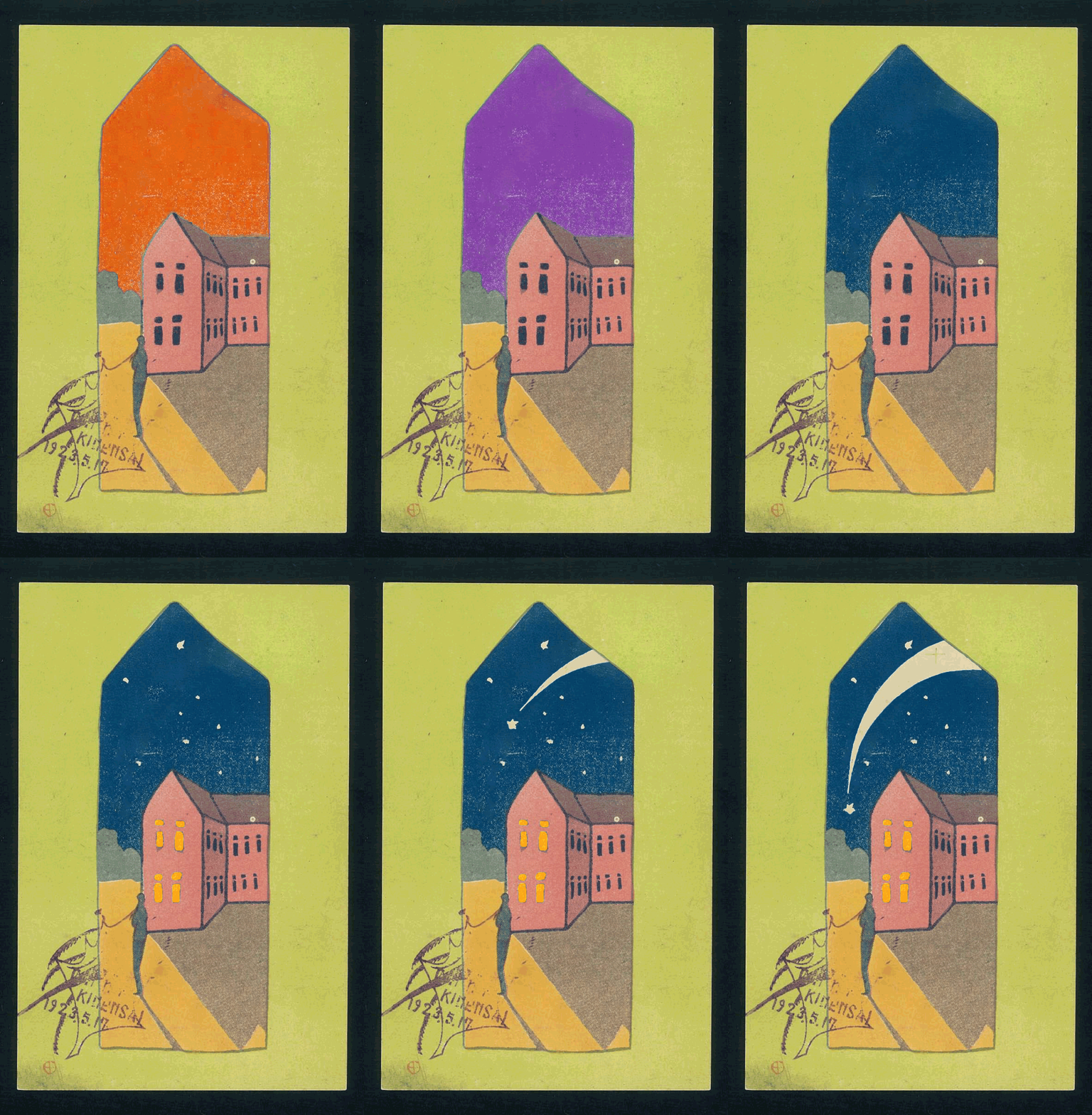
GIFアニメーションは、ウェブサイト上や、Twitter等のアプリ上で表示された際に動くものなので、利用している端末で表示した際には動画表示されないことがあります。ブラウザで表示するなどして動きを確認してください。
素敵な作品ができたら、ぜひGIF IT UPの応募ページから応募してみてください。
(作り方動画)
GIFアニメーションの作り方動画をご用意しました。動画を見て、皆さんもGIFアニメーションを作ってみましょう!
(もっと素敵な作品作りのヒント)
今回は2コマだけの簡単なアニメーションですが、工夫すれば、雪や桜吹雪を降らせたり、色を変えたり、連続写真や動画からGIFアニメーションを作ったりするなど、幅広い表現が可能です。次のページ(英語)も参考にしてください。
- Getting creative with stickers & effects – make your first GIF (Europeana)
- Playing with colours – make your first GIF IT UP entry (Europeana)
- How to make a GIF from a series of photos (Europeana)
- Make a GIF from a vintage video (Europeana)
- Gif-making online workshops (DPLA)
- How to make a GIF using free software (DigitalNZ)
- How to make an animated GIF from a stereograph (DigitalNZ)
- How to create an animated GIF using Gimp software (DigitalNZ)